> For the complete documentation index, see [llms.txt](https://docs.styleai.io/llms.txt). Markdown versions of documentation pages are available by appending `.md` to page URLs; this page is available as [Markdown](https://docs.styleai.io/product-docs/product-docs-en/design-asset-guide/fabric.md).
# Fabric
From uploading fabric images to expressing material properties (Drape)
## 1. Fabric Upload Guide
### 1-1. Use fabric photos that show texture
* Texture, drape, and even light response are expressed naturally
* E-commerce **It is recommended to crop only the fabric portion from product images and use that**
### 1-2. When photographing swatches, adjust saturation
* When shooting with a phone, colors often become **distorted into gray/yellow tones**
* Because AI reflects these colors as they are, the results may differ
* 👉 Before uploading, a simple **brightness/saturation correction** is recommended
{% embed url="" %}
***
## 2. Fabric Property Prompt Guide (Texture & Drape)
With just one fabric image, it is difficult to fully express texture and drape (the garment silhouette). \
To obtain realistic design results, the fabric photo and a prompt describing it must be combined.
### 2-1. Describe the fabric's drape characteristics in the prompt
Drape forms the overall silhouette of a garment, such as the sleeves, hem, volume, fit, and movement. \
Since flat swatch images cannot capture this three-dimensional information, you must define the fabric's physical properties through the prompt.
Key elements to include in the prompt:
* Thickness: Lightweight / Medium / Heavy
* Transparency: Sheer / Semi-sheer / Opaque
* Elasticity: No stretch / Slight stretch
* Seasonality: Summer / Winter
* Drape characteristics: Flowy / Structured / Stiff / Airy
***
### 2-2. Fabric property prompt writing examples
The realism of the garments generated by AI varies greatly depending on whether a prompt is included.
| Fabric Image | Without prompt | With prompt |
| ------------------------------------------------------------------------------------------------------------------------------------------------------------------------------------------------------------------------------------------------------------------------------------------------------------------------------------------------------------------------------ | --------------------------------------------------------------------------------------------------------------------------------------------------------------------------------------------------------------------------------------------------------- | --------------------------------------------------------------------------------------------------------------------------------------------------------------------------------------------------------------------------------------------------------- |
| *lightweight linen-blend woven with added stretch, smooth matte texture, soft flexible hand, fluid semi-drapey folds* | | |
| *lightweight stretch-woven linen blend, smooth matte surface, semi-sheer with soft fluid folds* | | |
| | | |
💡 Example 1: Linen-blend
* Prompt: Lightweight linen-blend fabric with added stretch, smooth matte texture, soft and flexible hand, fluid and gently draping folds *(English: lightweight linen-blend woven with added stretch, smooth matte texture, soft flexible hand, fluid semi-drapey folds)*
💡 Example 2: Lightweight Stretch Linen
* Prompt: Lightweight stretch linen blend, smooth matte surface, semi-sheer material with soft, fluid folds *(English: lightweight stretch-woven linen blend, smooth matte surface, semi-sheer with soft fluid folds)*
***
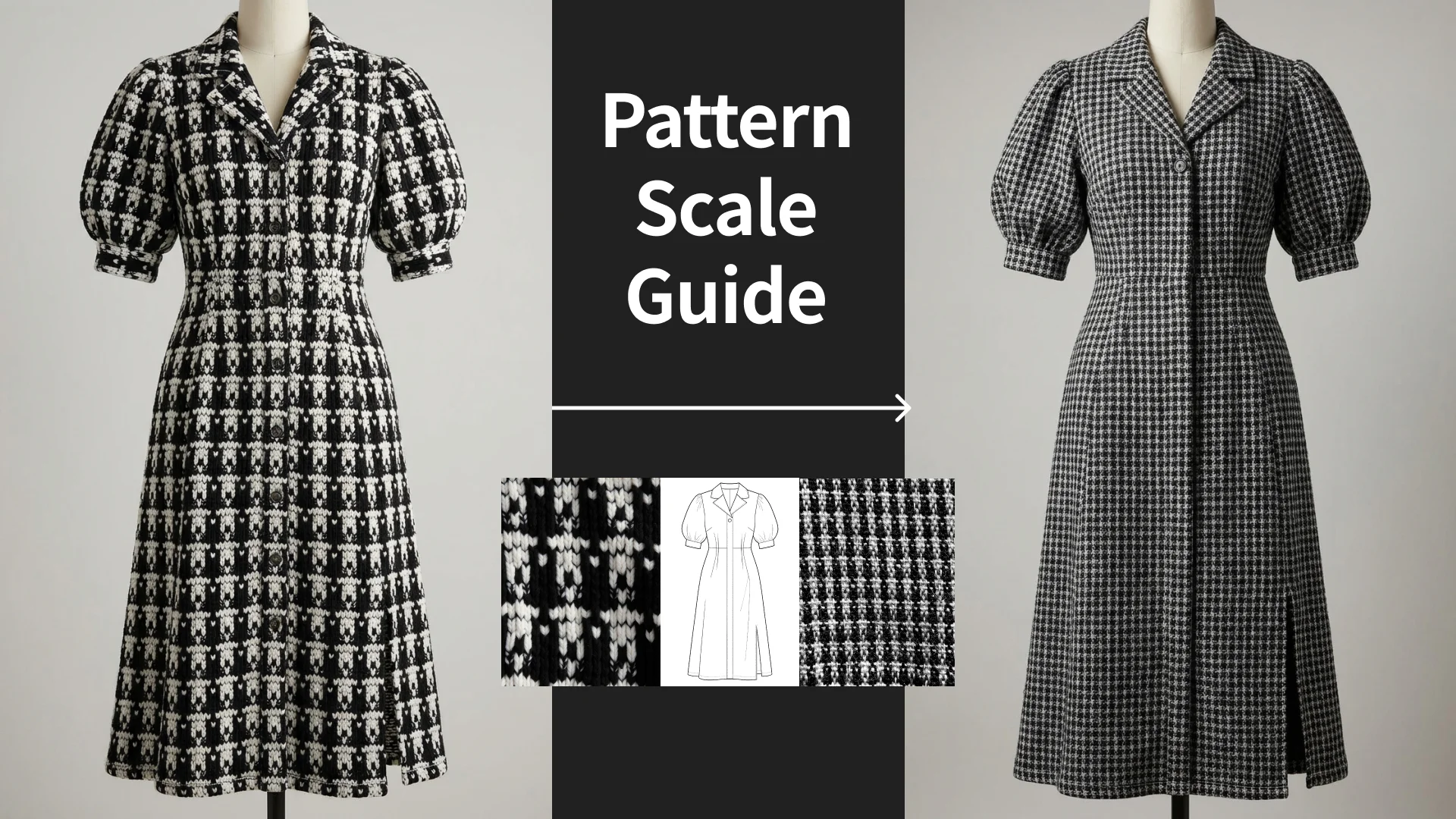
## **3.** Pattern Scale Adjustment Guide
AI interprets the pattern size in the uploaded image as is.
Therefore, if the image is distorted:
* Enlarged flower pattern → generated as an excessively large pattern
* Small repeating pattern → expressed too densely
### 3.1 Adjust pattern scale with the prompt
Even if the image is not suitable,\
You can adjust the scale with the prompt.
{% hint style="info" %}
Because the swatch is zoomed in, adjust the stripe pattern to a realistic garment scale: thin teal and white vertical stripes (approx. 5 mm each), narrow spacing, and multiple stripe repetitions across the entire garment. Maintain clean, continuous alignment.
{% endhint %}
### 3.2 Shoot from the distance at which it would appear on clothing
To keep the pattern scale accurate,\
image selection and shooting method are important.
**When there is only a swatch**
* Too close-up shot ❌
* Shot from the same distance as it would appear on real clothing ⭕
👉 Key point: **Make it look like the “actual wearing size”**


 *lightweight linen-blend woven with added stretch, smooth matte texture, soft flexible hand, fluid semi-drapey folds* |
  |
|  |
|
|
|  *lightweight stretch-woven linen blend, smooth matte surface, semi-sheer with soft fluid folds* |
  |
|  |
| | | |
💡 Example 1: Linen-blend
* Prompt: Lightweight linen-blend fabric with added stretch, smooth matte texture, soft and flexible hand, fluid and gently draping folds *(English: lightweight linen-blend woven with added stretch, smooth matte texture, soft flexible hand, fluid semi-drapey folds)*
💡 Example 2: Lightweight Stretch Linen
* Prompt: Lightweight stretch linen blend, smooth matte surface, semi-sheer material with soft, fluid folds *(English: lightweight stretch-woven linen blend, smooth matte surface, semi-sheer with soft fluid folds)*
***
## **3.** Pattern Scale Adjustment Guide
AI interprets the pattern size in the uploaded image as is.
Therefore, if the image is distorted:
* Enlarged flower pattern → generated as an excessively large pattern
* Small repeating pattern → expressed too densely
### 3.1 Adjust pattern scale with the prompt
Even if the image is not suitable,\
You can adjust the scale with the prompt.
|
| | | |
💡 Example 1: Linen-blend
* Prompt: Lightweight linen-blend fabric with added stretch, smooth matte texture, soft and flexible hand, fluid and gently draping folds *(English: lightweight linen-blend woven with added stretch, smooth matte texture, soft flexible hand, fluid semi-drapey folds)*
💡 Example 2: Lightweight Stretch Linen
* Prompt: Lightweight stretch linen blend, smooth matte surface, semi-sheer material with soft, fluid folds *(English: lightweight stretch-woven linen blend, smooth matte surface, semi-sheer with soft fluid folds)*
***
## **3.** Pattern Scale Adjustment Guide
AI interprets the pattern size in the uploaded image as is.
Therefore, if the image is distorted:
* Enlarged flower pattern → generated as an excessively large pattern
* Small repeating pattern → expressed too densely
### 3.1 Adjust pattern scale with the prompt
Even if the image is not suitable,\
You can adjust the scale with the prompt.