> For the complete documentation index, see [llms.txt](https://docs.styleai.io/llms.txt). Markdown versions of documentation pages are available by appending `.md` to page URLs; this page is available as [Markdown](https://docs.styleai.io/product-docs/product-docs-en/corporate-member/invite-and-remove-team-members-admin-only.md).
# Invite and Remove Team Members (Admin Only)
**1. Invite Team Members (Admins only)**
{% stepper %}
{% step %}
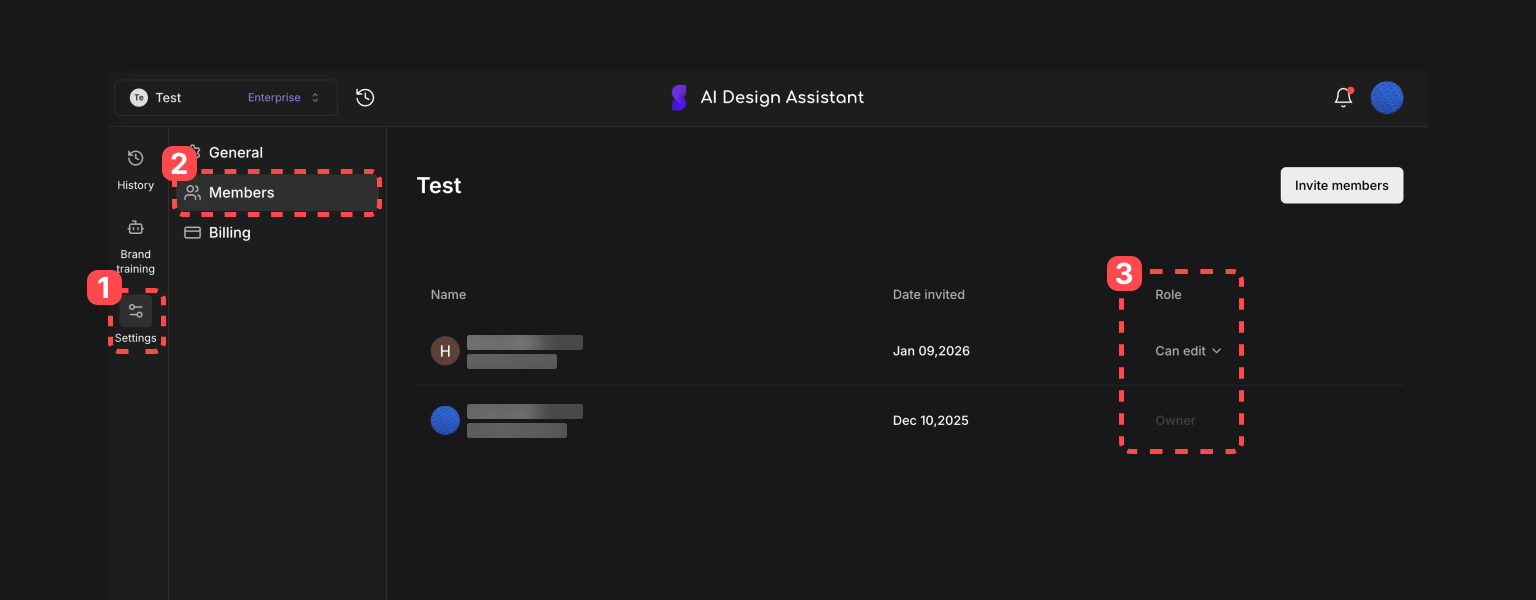
#### When entering the Brand Settings page, click Settings > Members > Invite members in order.
{% hint style="info" %}
Regardless of whether they have signed up, you can invite team members to the brand workspace using only their email address.
{% endhint %}
{% endstep %}
{% step %}
#### When clicked, you can invite team members by email address.
{% hint style="info" %}
After entering the email address **Press the Spacebar or Enter key to add the email.**
If you copy and paste multiple email addresses, they will not be recognized automatically, so **please enter the email addresses one by one.**
{% endhint %}
{% embed url="" %}
{% endstep %}
{% step %}
#### If needed, you can invite them by changing their role.
Member (Can edit): Cannot invite or remove members ❌
Admin: Can invite and remove members ✅
{% endstep %}
{% step %}
#### When you click the Invite button, an invitation will be sent to that email address.
{% endstep %}
{% step %}
#### How to move an invited team member to the brand workspace
1. You can select the invited brand workspace from the menu in the top left.
2. You can click the invitation notification message in the top right to go directly to that workspace.
{% endstep %}
{% endstepper %}
**2. Remove Team Members (Admins only)**
{% stepper %}
{% step %}
#### When entering the Brand Settings page, click the \[Role] section of the team member you want to remove under Settings > Members.
{% endstep %}
{% step %}
#### When you click \[Remove], that team member will be removed from the brand.
{% endstep %}
{% endstepper %}