# 원단

## 1. 원단 업로드 가이드

### 1-1. 질감을 확인할 수 있는 원단 사진 사용&#x20;

* 텍스처, 드레이프, 빛 반응까지 자연스럽게 표현됨
* 이커머스 **제품 이미지에서 원단 부분만 크롭해서 사용하는 것을 추천**

<figure><img src="/files/bv2RuNFSzmjIwJxD83hc" alt=""><figcaption></figcaption></figure>

### 1-2. 스와치 사진 촬영 시, 채도 조정 <a href="#id-2-adjust-fabric-color-common-designer-mistake-2" id="id-2-adjust-fabric-color-common-designer-mistake-2"></a>

* 휴대폰 촬영 시 색상이 **회색/노란톤으로 왜곡되는 경우 많음**
* AI는 이 색을 그대로 반영하기 때문에 결과가 달라질 수 있음
* 👉 업로드 전 간단한 **밝기/채도 보정** 권장

{% embed url="<https://youtu.be/2JgfGb_BREQ?si=BX6ULQxuT_MOa-1->" %}

***

## 2. 원단 물성 프롬프트 가이드 (Texture & Drape)

원단 이미지 한 장만으로는 질감과 드레이프(옷태)를 완벽하게 표현하기 어렵습니다. \
사실적인 디자인 결과물을 얻으려면 원단 사진과 이를 설명하는 프롬프트가 반드시 결합되어야 합니다.

### 2-1. 원단 드레이프 특성을 프롬프트에 묘사

드레이프는 소매, 밑단, 볼륨감, 핏, 움직임 등 의상의 전체적인 실루엣을 형성합니다. \
평면적인 스워치(Swatch) 이미지는 이러한 입체적인 정보를 담을 수 없으므로, 프롬프트를 통해 원단의물리적 특성을 정의해 주어야 합니다.

<figure><img src="/files/7YULf81aAD3WGFvcVatW" alt=""><figcaption></figcaption></figure>

프롬프트에 포함해야 할 주요 요소:

* 두께감 (Thickness): 가벼움(Lightweight) / 중간(Medium) / 무거움(Heavy)
* 투명도 (Transparency): 비침(Sheer) / 약간 비침(Semi-sheer) / 불투명(Opaque)
* 신축성 (Elasticity): 없음(No stretch) / 약간 있음(Slight stretch)
* 계절감 (Season): 여름용 / 겨울용
* 드레이프 특성 (Drape): 유동적인(Flowy) / 형태가 잡힌(Structured) / 뻣뻣한(Stiff) / 공기 같은(Airy)

***

### 2-2. 원단 물성 프롬프트 작성 예시

프롬프트 유무에 따라 AI가 생성하는 의상의 리얼리티는 큰 차이를 보입니다.

| Fabric Image                                                                                                                                                                             | Without prompt                                                      | With prompt                                                         |
| ---------------------------------------------------------------------------------------------------------------------------------------------------------------------------------------- | ------------------------------------------------------------------- | ------------------------------------------------------------------- |
| <img src="/files/y7Mr8mMWSGHXRkz3gqU5" alt="" data-size="original">*lightweight linen-blend woven with added stretch, smooth matte texture, soft flexible hand, fluid semi-drapey folds* | <img src="/files/zan6laZJXAVSzjfg90RE" alt="" data-size="original"> | <img src="/files/XujEdEJ3jItAVsk7gguY" alt="" data-size="original"> |
| <img src="/files/zUVY01x5iuFAZmlKN8m1" alt="" data-size="original">*lightweight stretch-woven linen blend, smooth matte surface, semi-sheer with soft fluid folds*                       | <img src="/files/VMVdhNDWKXhZ41vDQfGR" alt="" data-size="original"> | <img src="/files/JR05WRz8CxBtbka6ssTe" alt="" data-size="original"> |
|                                                                                                                                                                                          |                                                                     |                                                                     |

💡 예시 1: 리넨 혼방 (Linen-blend)

* 프롬프트: 신축성이 추가된 가벼운 리넨 혼방 직물, 매끄러운 매트 질감, 부드럽고 유연한 촉감, 유동적이고 부드럽게 흘러내리는 주름 *(English: lightweight linen-blend woven with added stretch, smooth matte texture, soft flexible hand, fluid semi-drapey folds)*

💡 예시 2: 가벼운 스트레치 리넨 (Lightweight Stretch Linen)

* 프롬프트: 가벼운 스트레치 리넨 혼방, 매끄러운 매트 표면, 부드럽고 유동적인 주름이 있는 반투명 재질 *(English: lightweight stretch-woven linen blend, smooth matte surface, semi-sheer with soft fluid folds)*

***

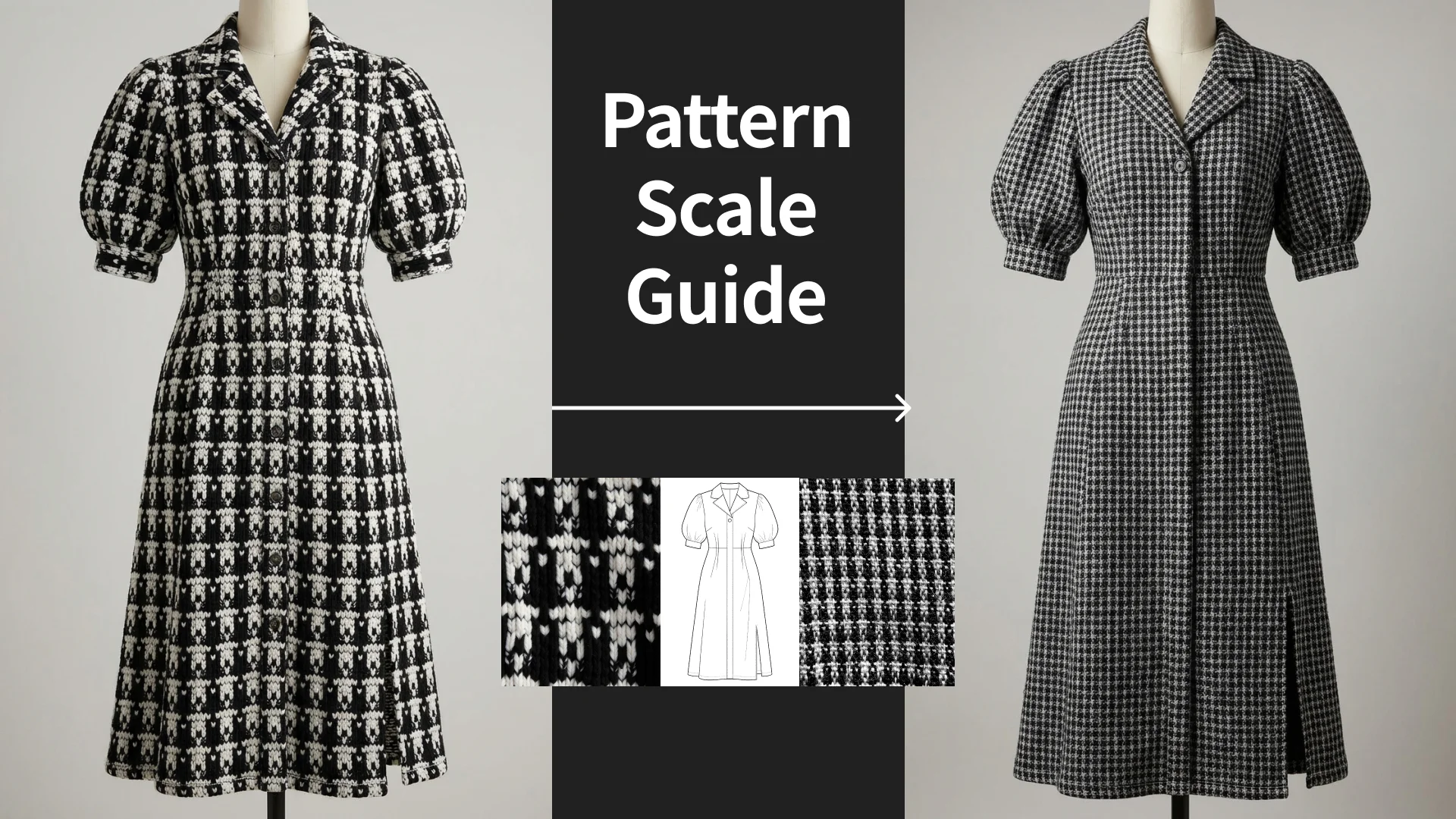
## **3.** 패턴 스케일 조정 가이드 <a href="#id-4-ensure-correct-pattern-scale-4" id="id-4-ensure-correct-pattern-scale-4"></a>

AI는 업로드된 이미지의 패턴 크기를 그대로 해석합니다.

따라서 이미지가 왜곡된 경우:

* 확대된 플라워 패턴 → 과하게 큰 패턴으로 생성
* 작은 반복 패턴 → 지나치게 촘촘하게 표현

### 3.1 프롬프트로 패턴 스케일 보정하기

이미지가 적절하지 않은 경우에도\
프롬프트로 스케일을 조정할 수 있습니다.

<figure><img src="/files/knHR0CqFJhsxa66Xy8nM" alt=""><figcaption></figcaption></figure>

{% hint style="info" %}
Because the swatch is zoomed in, adjust the stripe pattern to a realistic garment scale: thin teal and white vertical stripes (approx. 5 mm each), narrow spacing, and multiple stripe repetitions across the entire garment. Maintain clean, continuous alignment.
{% endhint %}

### 3.2 옷에서 보이는 거리감으로 촬영

패턴 스케일을 정확하게 유지하려면\
이미지 선택과 촬영 방식이 중요합니다.

**스와치만 있는 경우**

* 너무 가까운 촬영 ❌
* 실제 옷에서 보이는 거리감으로 촬영 ⭕

👉 핵심: **“실제 착용 기준 크기”로 보이게 하기**

<figure><img src="https://image.inblog.dev/?url=https%3A%2F%2Fsource.inblog.dev%2Fpost_image%2F2025-11-27T06%3A34%3A31.236Z-8c9cc548-bab5-4131-93b3-1b2c19a38f64&#x26;w=1920&#x26;q=85" alt="Pattern Scale Guide"><figcaption><p>Pattern Scale Guide</p></figcaption></figure>


---

# Agent Instructions: Querying This Documentation

If you need additional information that is not directly available in this page, you can query the documentation dynamically by asking a question.

Perform an HTTP GET request on the current page URL with the `ask` query parameter:

```
GET https://docs.styleai.io/design-asset-guide/fabric.md?ask=<question>
```

The question should be specific, self-contained, and written in natural language.
The response will contain a direct answer to the question and relevant excerpts and sources from the documentation.

Use this mechanism when the answer is not explicitly present in the current page, you need clarification or additional context, or you want to retrieve related documentation sections.